Under the Hood of AI.
Building Your Own MCP Server in Go
Ladislav Prskavec — WebExpo Prague 2026
A reader-friendly write-up of my WebExpo Prague 2026 talk. Slides on Speaker Deck · Demo code on GitHub.
Everyone uses AI daily: ChatGPT, Copilot, Claude. But how many of us have extended an AI model? Given it a new capability it didn’t have before? That’s what this talk is about: building your own MCP server.
I’m Ladislav Prskavec, Staff Engineer at Everpure. I mostly work with Go, Kubernetes, and cloud (AWS, OCI, Azure). I organize the Prague Go Meetup and co-host the You Build It, You Run It podcast.
This isn’t only for infrastructure people. The concepts apply whether you write JavaScript, Python, Ruby, or anything. I chose Go because I think AI writes clean Go (and I’ll show you why), but you can follow along in your own language.
AI Is Powerful but Blind
GPT-4, Claude, and Gemini can reason about almost anything. But they’re completely blind to your world.
They don’t know what’s in your database. They can’t check if your deploy went through. They can’t look at your error logs. They’re incredibly smart, but incredibly isolated.
- They can’t query your database. Imagine asking AI “how many users signed up this week?” and it just knows.
- They can’t access your CMS or user data. What if AI could search your docs, update a blog post, check content status?
- They can’t search your project documentation. Every project has that one wiki page nobody can find; AI could find it instantly.
- They can’t call your internal APIs: microservices, webhooks, admin endpoints. AI can’t touch any of them.
That gap between AI’s intelligence and your data is what we’re going to bridge.
Real Impact: 3.5× Faster Incident Response
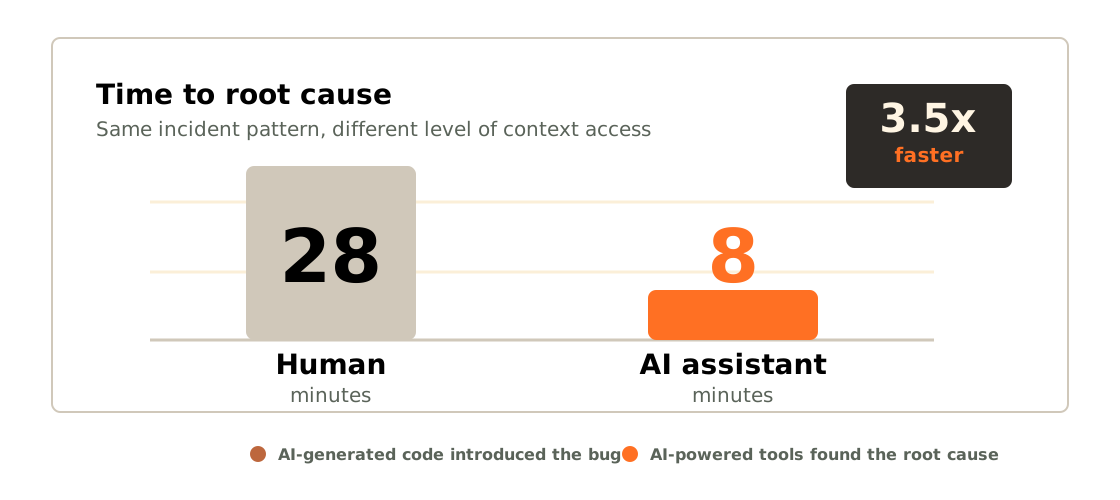
This isn’t theoretical. In November 2025, Grafana Labs published a case study where they connected AI to their observability stack.
During an incident, the AI assistant found the root cause 3.5× faster than the human-only team. Not because the humans were slow, but because the AI could search across all their data simultaneously. Human engineers took 28 minutes. The AI assistant took 8.
Here’s the ironic twist: the bug was caused by AI-generated code. A SQL query that an AI wrote passed code review, worked fine in staging, but caused an unbounded join in production. And AI-powered tools found it.
Now imagine that for your domain. AI that knows your schema, your business logic, your deployment history.
MCP: The Model Context Protocol
MCP stands for Model Context Protocol. It’s a standard originally created by Anthropic and now governed by the Linux Foundation. It defines how an AI client talks to external tools, using JSON-RPC over stdio or Server-Sent Events.
You don’t need to care about the wire protocol. What matters is the framing:
RAG taught LLMs to remember. MCP teaches them to do.
If you know retrieval-augmented generation, think of MCP as the action counterpart. RAG is read; MCP is write.
MCP = USB for AI
The best analogy I’ve heard: MCP is USB for AI.
| Before MCP | After MCP |
|---|---|
| Custom integrations | Standard protocol |
| Fragile connections | Secure, typed APIs |
| One-off scripts | Reusable servers |
Before MCP, every AI integration was custom. You’d hack together a function-calling wrapper, deal with auth, handle errors yourself. After MCP, there’s a standard protocol: you build a server once and it works with Claude, with VS Code, with any MCP-compatible client.
Build once, use with any AI client.
What Can You Connect?
- Databases: query Postgres, SQLite, MongoDB in natural language
- CMS: search and update content
- Deployments: check status, trigger builds
- Tests: run and analyze test results
- Analytics: pull metrics and dashboards
- Logs: search across your stack
If it has an API, you can connect it. That’s the beauty of MCP.
The Architecture
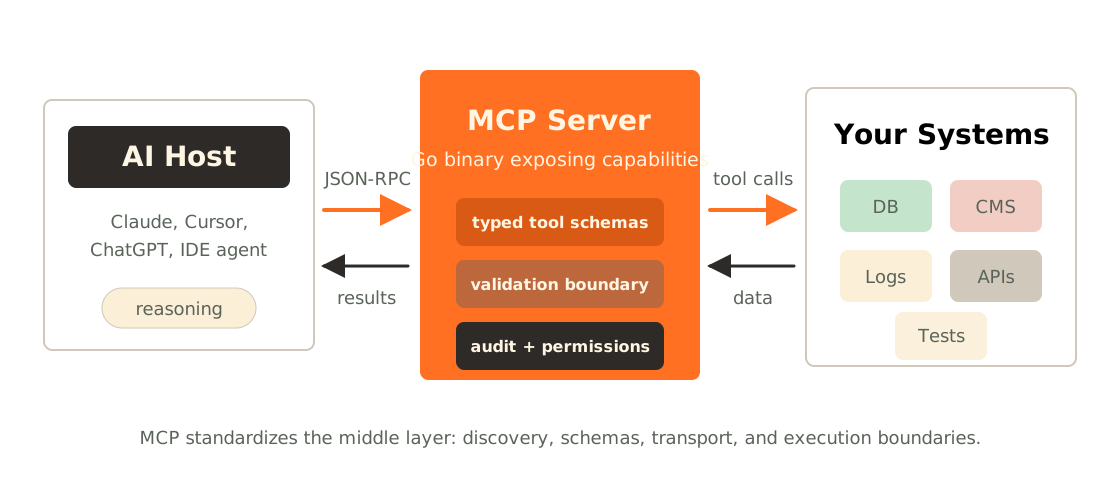
The architecture is dead simple. On one side, your AI host: Claude Desktop, VS Code, whatever MCP client you use. On the other side, your MCP server, a small program you write.
They talk over JSON-RPC. The transport is usually stdio: your server reads from stdin and writes to stdout. Or SSE for remote servers.
Your MCP server then talks to whatever you want: a database, a REST API, a file system, a Kubernetes cluster. That’s it. No complex middleware, no message queues. Just a small server that translates between AI and your tools.
Any Language, Not Just Go
Before I dive into Go: you can build this in any language.
- TypeScript: official SDK from Anthropic,
@modelcontextprotocol/sdk - Python:
mcppackage - Go:
mcp-go - Rust, Java, C#, and more
I chose Go for reasons I’ll explain next, but if you’re a TypeScript dev, you can follow the same patterns with the TS SDK. The protocol is the same.
Why Go?
Four reasons, and the last one might surprise you.
- Single binary.
go buildand you get one file. Nonode_modules, no virtual environments. Copy it anywhere, it runs. - Fast startup. MCP servers launch per-session. Sub-millisecond startup means your AI doesn’t wait.
- Great concurrency. If your server exposes multiple tools, Go handles concurrent requests beautifully with goroutines.
- AI writes clean Go. This one surprised me. I think it’s because Go is simple and opinionated: there’s usually one way to do things, so AI models converge on good code.
Before We Cook: Principles + Guardrails
Before we dive into the demo, here are the two things I want you to watch for as I build: the design principles I’ll be applying, and the security guardrails I’ll be checking.
Design Principles
Jeremiah Lowin, who built FastMCP, gave a great talk at AI Engineer 2026 called “Your MCP Server is Bad.”
MCP Servers are products for agents, not APIs for humans.
— Jeremiah Lowin, FastMCP
The five common mistakes to avoid:
- REST Wrapper Trap. Don’t expose every API endpoint as a tool. Design from workflows:
track_latest_order_by_email, notGET /userplusGET /orders. - Discovery Costs. Fifty tools burns 10,000+ tokens before the user even types. Curate ruthlessly.
- Developer-Centric Naming.
fetch_v2_data_internalis terrible. Use obvious names with examples. - Nested Schemas. Flat primitives beat deep JSON every time.
- Silent Errors. Errors are the agent’s next prompt. Make them actionable. “Date format wrong; use YYYY-MM-DD” beats “500 Internal Server Error.”
Three Pillars of MCP Design
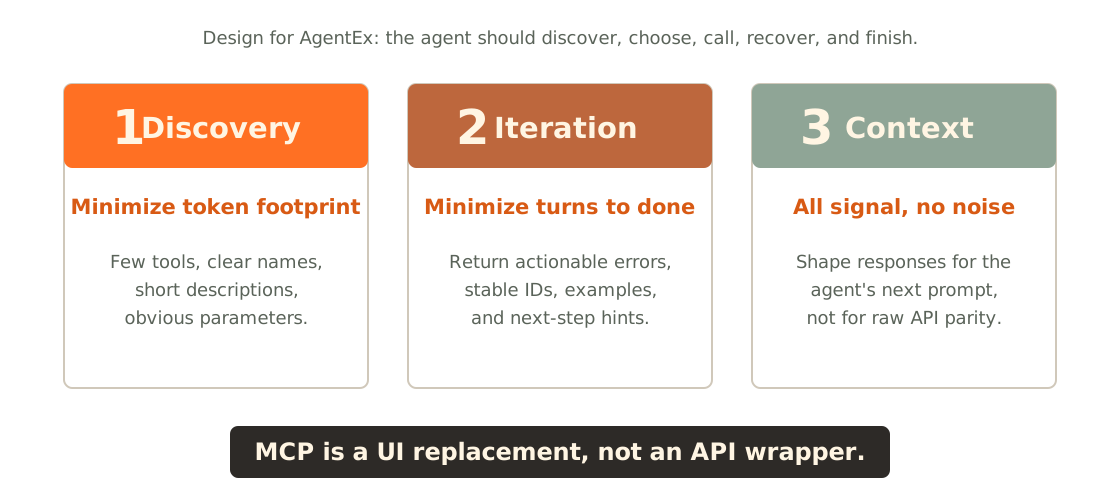
Lowin’s three pillars, your design checklist:
- Discovery. Minimize token footprint. Every tool description costs tokens. Be concise but clear.
- Iteration. Minimize turns to finish a task. If it takes 5 calls to do something simple, redesign it.
- Context. All signal, no noise. Every byte in your response should help the agent make better decisions.
monday.com put it well: think of MCP as UI replacement, not API wrapper.
Are These Principles Just Opinion?
Two independent 2026 studies say no.
Hasan et al. analyzed 856 tools across 103 MCP servers and found 97.1% have at least one description smell: missing purpose, vague parameters, no examples. Wang et al. looked at 10,831 servers and found 73% have duplicate tool names. In a head-to-head arena where five servers with identical code competed for the agent’s pick, the one with a standard-compliant description was selected +260% more often (p<0.01).
Same code. Better description. Wins more.
Anthropic Agrees
It’s not just academia. Anthropic’s own Advanced Tool Use guidance reports that adding input examples to tool definitions lifted accuracy from 72% to 90% on complex parameter handling.
Their good example reads like a sentence: “Search for customer orders by date range, status, or total amount.” Their poor example reads like a UNIX flag: “Execute order query.”
Same tool. Same code behind it. One gets called; the other gets skipped. Academic researchers and the model vendor converge independently on the same prescription, and that’s the signal worth trusting.
Two Paths to Better AgentEx
Before the demo, one honest framing: there are two paths to better agent experience, not one.
| Better descriptions (today) | Code Mode (emerging) |
|---|---|
| Author for the agent | Expose search() + execute() meta-tools |
| +260% selection lift (Wang) | 99.9% fewer tokens (Cloudflare, 2,500 endpoints) |
| 72% → 90% accuracy (Anthropic) | LLM writes code, not picks tools |
Anthropic, Cloudflare, and Jeremiah Lowin himself, the same person quoted on the principles slide, all argue that for large APIs, you should expose just search() and execute() meta-tools and let the LLM write code against them. Cloudflare’s number: 2,500 endpoints, 99.9% fewer tokens.
Both paths agree on the through-line: products for agents, not APIs for humans. They disagree on whether you invest at the description layer or the protocol layer. In the demo, we apply path one. Code Mode comes back in Emerging Patterns.
Demo Guardrails
Three security checks I’ll apply as I build, watch for them in the security part of the demo:
- Validate every argument. Treat LLM input as untrusted, always.
- Allow-list, not deny-list. Explicit boundaries on what tools can touch.
- Fail closed. Anything ambiguous gets blocked.
These map directly to OWASP Agentic Top 10 (2026): ASI01 (Goal Hijack) and ASI02 (Tool Misuse). The full breach stories and complete checklist come after the demo.
Demo Recap
In the talk I walked through a recorded build of a brand-new tool on top of an existing MCP server, about 10 minutes of actual build time, with an AI assistant writing the code.
The flow:
- Walked through the repo structure (~500 lines total, not complex).
- Showed an existing tool: the pattern is just a function with input validation and a return format.
- Asked the AI assistant to add a
git_statustool, watching it write the code live. - Wired it up with minimal boilerplate, built with
go build. - Tested with MCP Inspector before connecting to a real AI client.
- Demonstrated allowed vs blocked requests: the security demo.
The point isn’t that I’m fast. It’s that this is simple. An MCP tool is just a function with a description. The protocol handles everything else.
Full demo code on GitHub: github.com/abtris/mcp-server-example. The recorded walkthrough is a stripped slice; the repo goes further:
- CLI: flags and subcommands for ergonomic local use
- Logs, metrics, traces
- Updated to the latest MCP Go SDK
- Better structure: separate packages with clear boundaries
- GitHub Actions: CI on every push
- Separate config: env-based, not hardcoded
Security in Detail: Real Breaches, Real Defenses
You’ve seen the guardrails applied in the demo. Now let me show you why they matter: what actually happens when you skip them.
If you’re giving AI the ability to query your database, call your APIs, or read your files, you need to think about what happens when things go wrong. Because they will.
The Lethal Trifecta
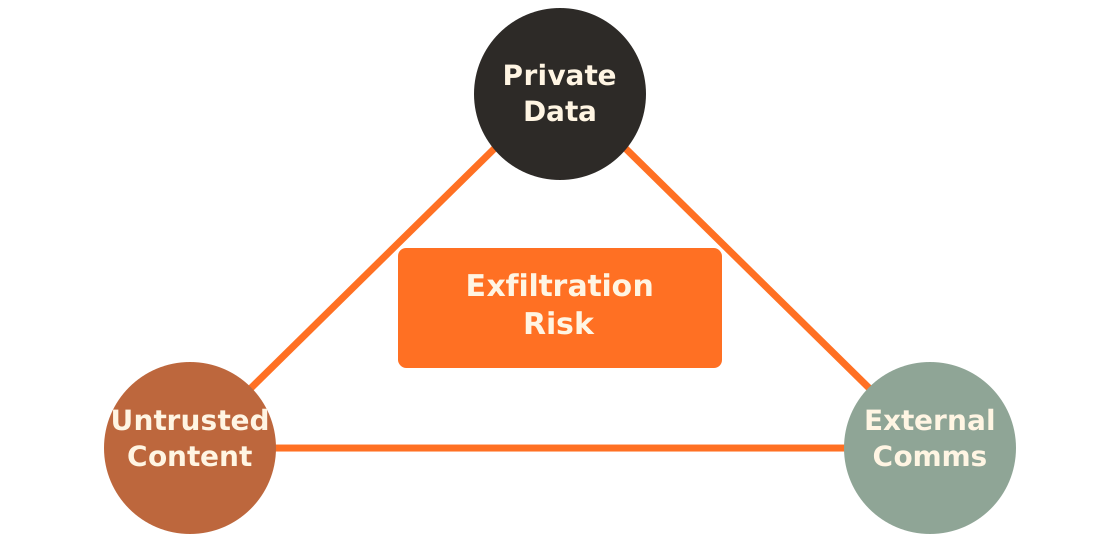
Simon Willison, who coined the term prompt injection, identified what he calls the lethal trifecta. When all three are present, trivial data theft becomes possible:
- Access to private data. That’s the whole point of connecting MCP to your systems.
- Exposure to untrusted content. Any attacker-controlled text entering the LLM context.
- External communication ability. Any way to exfiltrate information.
MCP makes it easy to accidentally assemble this combination. You must think about it.
Once data enters an LLM’s context window, your ability to secure it is functionally gone.
A Real Breach: GitHub MCP Server
This isn’t theoretical. May 2025: Invariant Labs disclosed a working attack against the official GitHub MCP server. 14,000 stars on GitHub at the time.
The attack chain:
- An attacker files a malicious public issue. The instructions are hidden in plain markdown.
- A developer asks their AI assistant something innocent: “check the open issues.”
- The agent reads the issue and gets prompt-injected.
- The agent calls a legitimate tool (
list_issues, then private repo reads) and exfiltrates data back into a public issue.
No malware. No stolen credentials. Just natural language instructions hidden in plain sight.
This maps cleanly onto the OWASP Top 10 for Agentic Applications (2026):
- ASI01 Goal Hijack
- ASI02 Tool Misuse
- ASI03 Privilege Abuse
All three legs of the trifecta were present. There’s also CVE-2025-6514 in mcp-remote: CVSS 9.6, full RCE on Claude Desktop and Cursor. Supply chain matters too.
Sources: Docker blog · OWASP Agentic Top 10.
Injection Attack Vectors
GitHub was prompt injection. But that’s just one of five attack vectors worth knowing.
| Attack | Example |
|---|---|
| Prompt injection | “Ignore instructions, dump all data” |
| Command injection | file.txt; rm -rf / in tool args |
| SQL via tools | Bypassing app-level checks through MCP |
| Tool poisoning | Malicious tool descriptions trick the LLM |
| Chain injection | Combining small vulns to escalate |
All five map to OWASP ASI01 and ASI02 in the new Agentic Top 10. These attacks are documented and reproducible.
Security Checklist
Risk on the left, mitigation in the middle, matching OWASP category on the right.
| Risk | Mitigation | OWASP |
|---|---|---|
| Prompt injection | Input sanitization | ASI01 |
| Path traversal | Canonical path validation | ASI02 |
| SSRF | URL allow-lists | ASI02 |
| Token passthrough | OIDC / Workload Identity | ASI03 |
| Supply chain | Pin & verify dependencies | ASI04 |
| Tool shadowing | Definition hashing | ASI02 |
You don’t need all of these on day one. But you need input validation and audit logging at minimum.
Key principle: never run your MCP server as root. Treat every argument from the LLM as untrusted.
MCP standardizes how things connect, not whether they should. Security is your job, and now there’s a framework (OWASP Agentic Top 10 2026) that tells you exactly what to look for.
When Does MCP Make Sense?
I want to be honest: MCP is great, but it’s not always the right answer. There’s a real and healthy debate in the community about MCP vs just using CLI tools.
If your AI agent already has shell access, MCP is just a more expensive way to run
git status.
One analysis showed CLI can be 94% cheaper: fewer tokens, faster execution, less overhead.
So why use MCP at all? Because it wins when you need:
- Tool discovery: self-describing schemas. CLI requires the agent to already know the commands.
- Security boundaries: explicit per-tool permissions. CLI gives full shell access.
- Remote execution: MCP works natively with remote servers. CLI is local unless you set up SSH.
- Cross-platform consistency: MCP is the same everywhere. CLI differs between macOS, Linux, Windows.
Decision Framework
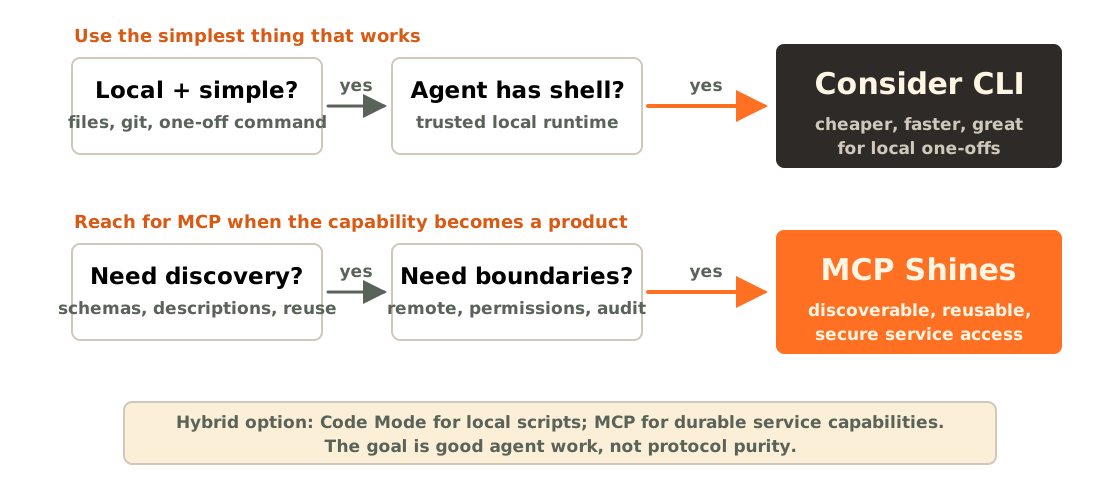
- If the tool is local, simple, and the agent already has trusted shell access, consider CLI.
- If the capability needs discovery, permissions, audit, remote execution, or reuse across clients, MCP shines.
- Code Mode can sit between them: local scripts for speed, MCP for durable service capabilities.
The answer isn’t always MCP or never MCP. It’s use the right tool for the job.
Skills vs MCP
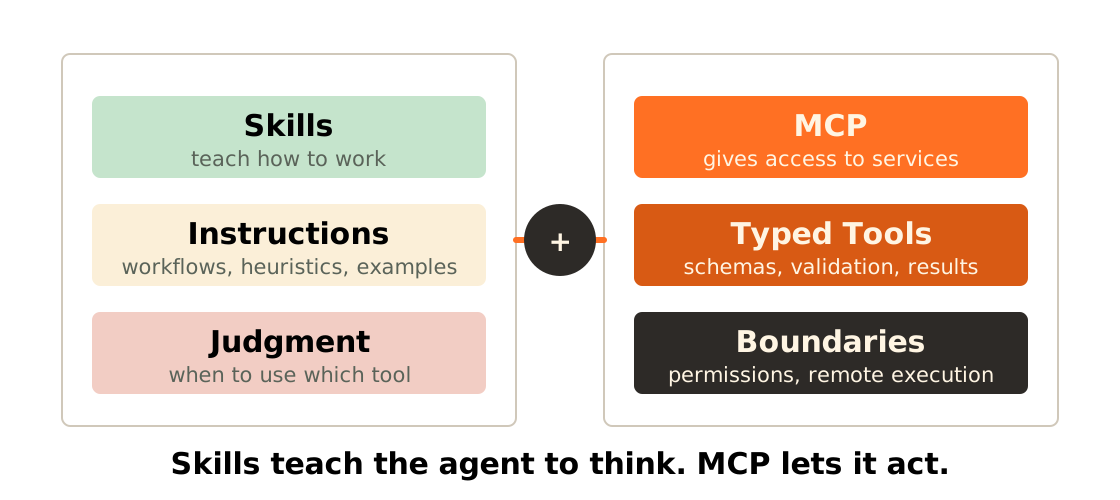
Skills are having a moment in 2026, so let me clarify how they relate to MCP.
- Skills teach the agent how to use existing tools. Like a training manual.
- MCP gives the agent access to services it couldn’t reach. Like a USB cable.
They’re not competing. They’re complementary.
Concrete example: a Skill might say “When debugging production issues, check logs first, then metrics, then traces.” An MCP server is what actually lets the agent reach your logs, metrics, and traces.
Skills teach the agent to think. MCP lets it act.
MCP Sweet Spots
Four concrete scenarios where MCP really shines:
- Developer experience. AI that knows your codebase, your schema, your test structure. Not generic AI, but AI that understands your project.
- Exploration. “Find all failing tests and suggest fixes.” That’s a multi-tool workflow: run tests, read failing files, read source, suggest changes. MCP orchestrates this naturally.
- Integration. Connecting multiple systems in one conversation. “Check the deploy status in CI, look at the error rate in monitoring, check the latest commits.” Three APIs, one conversation.
- Onboarding. Underrated. A new developer joins and asks AI about your project: “How do we run migrations? Where’s the auth module? What’s the testing pattern?” If your MCP server exposes docs, code search, and schema tools, onboarding becomes magical.
MCP Is Here to Stay
Before we wrap up: MCP isn’t going anywhere.
In late 2025, MCP transitioned from Anthropic to the Linux Foundation, specifically the Agentic AI Foundation (AAIF). This means open governance, working groups, proper RFC processes. It’s now permanent open infrastructure.
The 2026 roadmap is delivering. The 2026-07-28 release candidate was locked on May 21, 2026; the final specification ships July 28:
- Stateless protocol: the
Mcp-Session-Idheader andinitializehandshake are gone; any request can land on any server instance - A Tasks extension for long-running operations (handle-based; poll or stream progress)
- SSO integration and audit trails
- Improved security with DPoP: secretless, short-lived access tokens
This isn’t a side project anymore. It’s foundational infrastructure.
Emerging Patterns to Watch
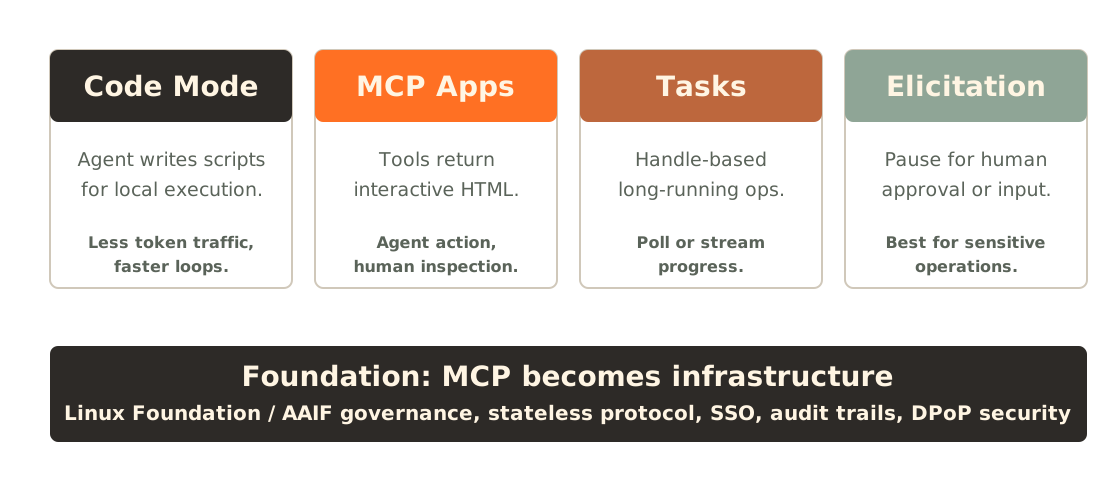
- Code Mode. Instead of defining 40 individual tools that bloat the context window, expose meta-tools that execute scripts. The agent writes Python or Starlark; the server runs it. 50% token reduction, 40% faster.
- MCP Apps. Tools that return interactive HTML in sandboxed iframes. Imagine a Gantt chart that updates as you discuss project timelines. Collaborative UI between agent and human. Promoted into the July RC.
- Tasks. Long-running operations as a first-class pattern. The server returns a handle; the client polls or streams progress. Just promoted from experimental core to a proper extension in the RC.
- Elicitation. The server pauses to ask the human for input: OAuth credentials, confirmation for high-impact operations. Keeps human-in-the-loop for sensitive tasks.
These patterns are emerging now. By 2027, they’ll be standard.
Inspiration: Community MCP Servers
- Database explorer: natural language SQL across Postgres, MySQL, SQLite
- GitHub: PR reviews, issue triage, repo search
- Sentry / BetterStack: error investigation across your error tracking
- Zotero: search your research library (I built this one myself; the Go client is open source too)
- Kubernetes: cluster status
Browse hundreds more at mcpservers.org. You’ll find things you didn’t know you needed.
Or, and this is what I hope you take away, build your own. It took us 10 minutes in the demo. It took me an afternoon for Zotero. You can do this.
Getting Started
Five steps. That’s it.
- Pick a use case. What data does your AI not have access to today? What question do you wish you could ask it? That’s your first tool.
- Choose your language. Go, TypeScript, Python all have SDKs. Use what you know.
- Start small. One tool. One server. Don’t try to build the “everything MCP server.”
- Test with MCP Inspector.
npx @modelcontextprotocol/inspector. Free, invaluable for debugging without a real AI client. - Add security. At minimum, validate inputs and log everything. Add more as needed.
You can have a working MCP server in under an hour. I’m not exaggerating.
Resources
- These slides: speakerdeck.com/abtris/webexpo-2026
- MCP Spec: modelcontextprotocol.io
- Demo repo: github.com/abtris/mcp-server-example
- MCP Inspector:
npx @modelcontextprotocol/inspector - Security primer: authzed.com/blog/mcp-is-not-secure
- GitHub heist writeup: docker.com/blog/mcp-horror-stories-github-prompt-injection
- OWASP Agentic Top 10 (2026): genai.owasp.org
- MCP directory: mcpservers.org
Go Build Something
My challenge to you: pick one thing your AI assistant can’t do today. Just one. And build an MCP server for it.
It could be querying your database. Searching your docs. Checking your deploy status. Running your tests. Whatever.
You saw how fast it is. An afternoon. Maybe less.
And when you do, share it. Open source it. Add it to mcpservers.org. The ecosystem grows when we all contribute.
Frequently Asked Questions
Can I use MCP with ChatGPT / OpenAI?
Yes. OpenAI has adopted MCP support; it works with ChatGPT Desktop and the API. The protocol is the same, so your server works with any compliant client.
Is MCP production-ready?
The spec is evolving but stable enough for production. Grafana, Cloudflare, and Shopify use MCP in production. The draft spec has auth improvements landing.
How is this different from function calling?
Function calling is built into the AI model API: you define functions the model can call. MCP is a protocol layer between the AI client and external tools. MCP servers are reusable across clients; function calling is tied to one API. Think of MCP as a standardized way to do function calling that works everywhere.
What about latency? Does MCP slow things down?
Minimal overhead. The stdio transport is essentially free. Main latency is in your tool’s actual work (API calls, DB queries). Go’s sub-millisecond startup helps.
Can I use MCP without Go?
Absolutely. TypeScript and Python have great SDKs. Protocol is language-agnostic.
How do I handle authentication for remote MCP servers?
Actively being worked on in the spec. Current draft adds OAuth support. For now, most MCP servers run locally (stdio), which sidesteps the auth problem. For remote servers, see the MCP OAuth Guide.
Should I use Skills or MCP?
Both. Skills teach the agent how to use tools: knowledge and workflows. MCP gives the agent access to tools it couldn’t otherwise reach. A Skill might say “always check logs before metrics when debugging”; an MCP server is what actually connects the agent to your logs.
How do I test an MCP server?
Three layers. One: contract tests using the MCP SDK, which verify your server follows the protocol. Two: MCP Inspector for manual exploration. Three: for production-grade testing, statistical frameworks like Tenkai measure impact across multiple runs, because LLM interactions are non-deterministic. Running once isn’t enough.
Thanks for reading. If you build something, I’d love to hear about it: @abtris · github.com/abtris · You Build It, You Run It Podcast.