Build nice terminal UI with Bubble Tea
Building a nice terminal UI in Go with Bubble Tea
If you want to build text-based user interfaces in Go, Bubble Tea is a good option. It makes building TUI (Text User Interface) applications easier, and the results can look good and stay interactive.
What is Bubble Tea?
Bubble Tea is a Go library from Charm_, based on The Elm Architecture, which keeps state and UI updates predictable. It works well for dashboards, command-line tools, and games.
Key Features
- Elm-inspired architecture: manage application state in a structured, predictable way.
- Rendering: build interactive interfaces with the Bubble Tea rendering engine.
- Concurrency: use Go’s concurrency model for responsive applications.
- Cross-platform: works across operating systems.
Getting Started
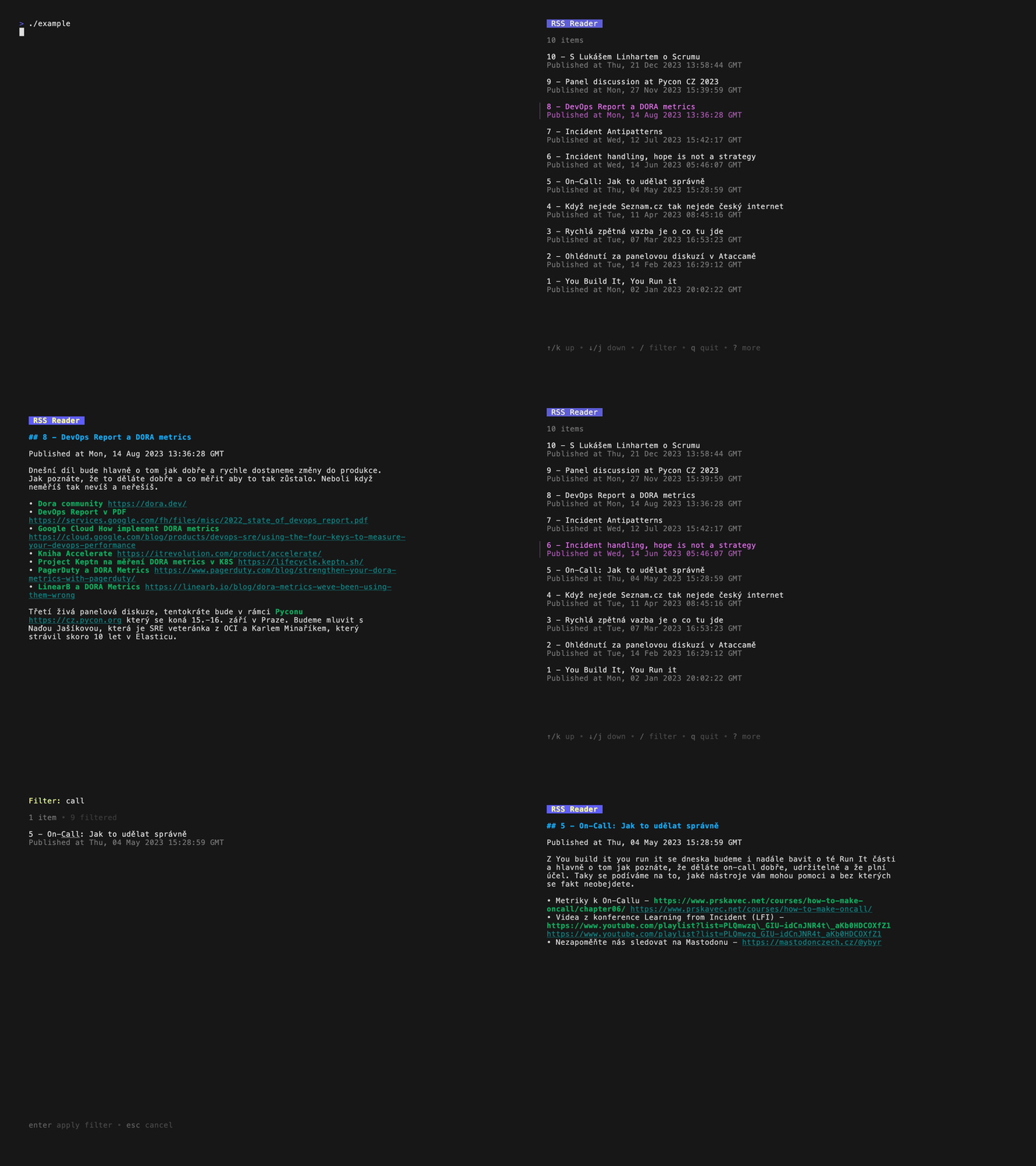
I will use simple application that I created for demo purpose.
It’s a simple RSS reader that fetches the latest items from a feed and shows them in the terminal. It uses Bubble Tea for the TUI, so you can navigate the news items and read the full content of each article.
Main app run model and give TUI data. Project have all components related to TUI in tui package.
package main

import (
	"fmt"
	"log"
	"os"

	"github.com/abtris/rss-bubbletea/tui"
	tea "github.com/charmbracelet/bubbletea"
	"github.com/mmcdole/gofeed"
)

func main() {
	file, _ := os.Open("data/podcast.xml")
	defer file.Close()
	fp := gofeed.NewParser()
	feed, err := fp.Parse(file)
	if err != nil {
		log.Fatal("parse feed failed", err)
	}

	model, err := tui.NewModel(feed)
	if err != nil {
		log.Fatal("create model failed", err)
	}

	if len(os.Getenv("DEBUG")) > 0 {
		f, err := tea.LogToFile("debug.log", "debug")
		if err != nil {
			fmt.Println("fatal:", err)
			os.Exit(1)
		}
		defer f.Close()
	}

	p := tea.NewProgram(model, tea.WithAltScreen(), tea.WithMouseCellMotion())
	if err := p.Start(); err != nil {
		log.Fatal("start failed: ", err)
	}
}
model tui/model.go using list component from Bubbles component library.
package tui

import (
	"log"

	md "github.com/JohannesKaufmann/html-to-markdown"
	"github.com/charmbracelet/bubbles/list"
	"github.com/mmcdole/gofeed"
)

type model struct {
	list     list.Model
	choice   string
	content  string
	detail   bool
	quitting bool
}

const width = 80
const height = 40
const title = "RSS Reader"

func NewModel(data *gofeed.Feed) (*model, error) {
	var items []list.Item
	converter := md.NewConverter("", true, nil)
	for _, rssItem := range data.Items {
		markdown, err := converter.ConvertString(rssItem.Description)
		if err != nil {
			log.Println("Convert to markdown", err)
		}
		i := item{
			title: rssItem.Title,
			desc:  "Published at " + rssItem.Published + "\n\n" + markdown,
		}
		items = append(items, i)
	}
	l := list.New(items, list.NewDefaultDelegate(), width, height)
	l.Title = title

	return &model{
		list:    l,
		choice:  "",
		content: "",
		detail:  false,
	}, nil
}
interaction with interface is covered by tui/update.go
package tui

import (
	tea "github.com/charmbracelet/bubbletea"
)

func (m model) Update(msg tea.Msg) (tea.Model, tea.Cmd) {
	switch msg := msg.(type) {
	case tea.WindowSizeMsg:
		m.list.SetWidth(msg.Width)
		return m, nil

	case tea.KeyMsg:
		switch keypress := msg.String(); keypress {
		case "q", "ctrl+c":
			m.quitting = true
			return m, tea.Quit

		case "enter":
			i, ok := m.list.SelectedItem().(item)
			if ok {
				m.detail = true
				m.choice = string(i.title)
				m.content = string(i.desc)
			}
			return m, nil
		case "b":
			if m.detail {
				m.choice = ""
				m.content = ""
			}
		case "p":
			if m.detail {
				changeIndex := m.list.Index() + 1
				if changeIndex <= 0 {
					changeIndex = 0
				}
				m.list.Select(changeIndex)
				i, ok := m.list.SelectedItem().(item)
				if ok {
					m.choice = string(i.title)
					m.content = string(i.desc)
				}
			}
		case "n":
			if m.detail {
				changeIndex := m.list.Index() - 1
				maxLength := len(m.list.Items())
				if changeIndex > (maxLength - 1) {
					changeIndex = maxLength - 1
				}
				m.list.Select(changeIndex)
				i, ok := m.list.SelectedItem().(item)
				if ok {
					m.choice = string(i.title)
					m.content = string(i.desc)
				}
			}
		}
	}

	var cmd tea.Cmd
	m.list, cmd = m.list.Update(msg)
	return m, cmd
}
and view tui/view.go take care about rendering. I’m using glamour for rendering markdown content.
package tui

import (
	"log"

	"github.com/charmbracelet/glamour"
)

func (m model) View() string {
	var s string
	if len(m.choice) > 0 {
		s += "# " + title
		s += "\n## " + m.choice
		s += "\n\n"
		s += m.content
		renderer, err := glamour.NewTermRenderer(
			glamour.WithAutoStyle(),
			glamour.WithWordWrap(width),
		)
		if err != nil {
			return ""
		}
		out, err := renderer.Render(s)
		if err != nil {
			log.Println(err)
		}
		return out
	}
	return m.list.View()
}
Whole demo is recorded using VHS.
Conclusion
Bubble Tea is a solid library for building terminal UIs in Go. Whether you’re writing a small command-line tool or a more involved interactive app, it gives you what you need without much ceremony.
I had talk about Bubble Tea on Go meetup #15.